---
title: Connecting Neon to your stack
subtitle: Learn how to integrate Neon into your application
enableTableOfContents: true
redirectFrom:
- /docs/get-started-with-neon/connect-neon
updatedOn: '2026-01-24T16:13:09.587Z'
---
Connecting to Neon works like any Postgres database. You use a standard connection string with your language or framework of choice. This guide shows you the essentials to get connected quickly.
## Get your connection string
From your Neon **Project Dashboard**, click the **Connect** button to open the **Connection Details** modal. Select your branch, database, and role. Your connection string appears automatically.
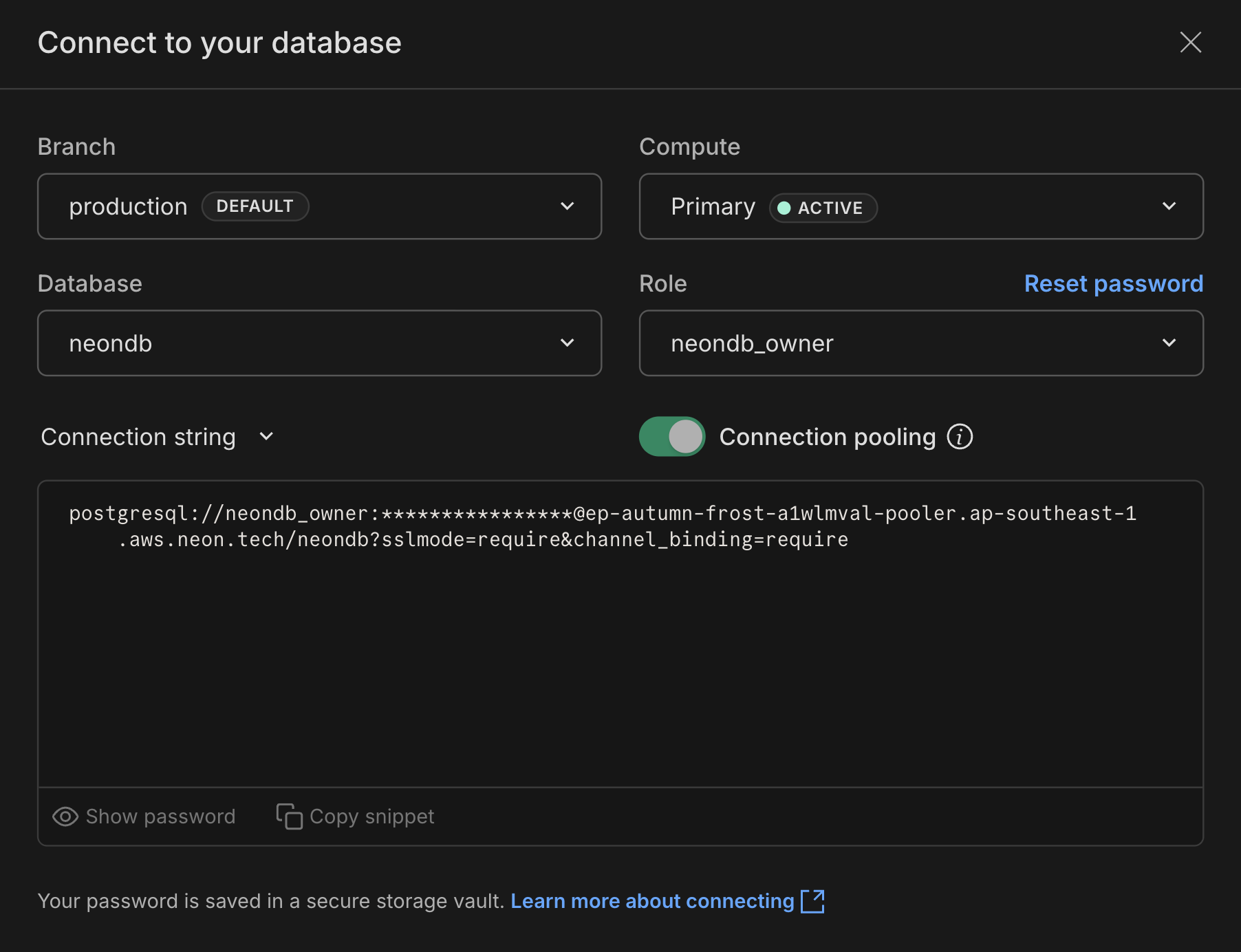
The connection string includes everything you need to connect:
```text
postgresql://alex:AbC123dEf@ep-cool-darkness-a1b2c3d4.us-east-2.aws.neon.tech/dbname?sslmode=require
^ ^ ^ ^
role -| | |- hostname |- database
|
|- password
```
Neon supports both pooled and direct connections. Use a pooled connection string (with `-pooler` in the hostname) if your application creates many concurrent connections. See [Connection pooling](/docs/connect/connection-pooling) for details.
## Connect from your application
Use your connection string to connect from any application. Here are examples for various frameworks and languages:
```javascript
// Works in Node.js, Next.js, serverless, and edge runtimes
import { neon } from '@neondatabase/serverless';
const sql = neon(process.env.DATABASE_URL);
const users = await sql`SELECT * FROM users`;
```
```javascript
// Next.js example
import postgres from 'postgres';
let { PGHOST, PGDATABASE, PGUSER, PGPASSWORD } = process.env;
const conn = postgres({
host: PGHOST,
database: PGDATABASE,
username: PGUSER,
password: PGPASSWORD,
port: 5432,
ssl: 'require',
});
const users = await conn`SELECT * FROM users`;
```
```javascript
// Drizzle example with the Neon serverless driver
import { neon } from '@neondatabase/serverless';
import { drizzle } from 'drizzle-orm/neon-http';
const sql = neon(process.env.DATABASE_URL);
const db = drizzle(sql);
const result = await db.select().from(...);
```
```javascript
// Prisma example with the Neon serverless driver
import { neon } from '@neondatabase/serverless';
import { PrismaNeonHTTP } from '@prisma/adapter-neon';
import { PrismaClient } from '@prisma/client';
const sql = neon(process.env.DATABASE_URL);
const adapter = new PrismaNeonHTTP(sql);
const prisma = new PrismaClient({ adapter });
```
```python
# Python example with psycopg2
import os
import psycopg2
# Load the environment variable
database_url = os.getenv('DATABASE_URL')
# Connect to the PostgreSQL database
conn = psycopg2.connect(database_url)
with conn.cursor() as cur:
cur.execute("SELECT version()")
print(cur.fetchone())
# Close the connection
conn.close()
```
```go
// Go example
package main
import (
"database/sql"
"fmt"
"log"
"os"
_ "github.com/lib/pq"
"github.com/joho/godotenv"
)
func main() {
err := godotenv.Load()
if err != nil {
log.Fatalf("Error loading .env file: %v", err)
}
connStr := os.Getenv("DATABASE_URL")
if connStr == "" {
panic("DATABASE_URL environment variable is not set")
}
db, err := sql.Open("postgres", connStr)
if err != nil {
panic(err)
}
defer db.Close()
var version string
if err := db.QueryRow("select version()").Scan(&version); err != nil {
panic(err)
}
fmt.Printf("version=%s\n", version)
}
```
```csharp
# .NET example
## Connection string
"Host=ep-cool-darkness-123456.us-east-2.aws.neon.tech;Database=dbname;Username=alex;Password=AbC123dEf"
## with SSL
"Host=ep-cool-darkness-123456.us-east-2.aws.neon.tech;Database=dbname;Username=alex;Password=AbC123dEf;SSL Mode=Require;Trust Server Certificate=true"
## Entity Framework (appsettings.json)
{
...
"ConnectionStrings": {
"DefaultConnection": "Host=ep-cool-darkness-123456.us-east-2.aws.neon.tech;Database=dbname;Username=alex;Password=AbC123dEf;SSL Mode=Require;Trust Server Certificate=true"
},
...
}
```
```ruby
# Ruby example
require 'pg'
require 'dotenv'
# Load environment variables from .env file
Dotenv.load
# Connect to the PostgreSQL database using the environment variable
conn = PG.connect(ENV['DATABASE_URL'])
# Execute a query
conn.exec("SELECT version()") do |result|
result.each do |row|
puts "Result = #{row['version']}"
end
end
# Close the connection
conn.close
```
```rust
// Rust example
use postgres::Client;
use openssl::ssl::{SslConnector, SslMethod};
use postgres_openssl::MakeTlsConnector;
use std::error;
use std::env;
use dotenv::dotenv;
fn main() -> Result<(), Box> {
// Load environment variables from .env file
dotenv().ok();
// Get the connection string from the environment variable
let conn_str = env::var("DATABASE_URL")?;
let builder = SslConnector::builder(SslMethod::tls())?;
let connector = MakeTlsConnector::new(builder.build());
let mut client = Client::connect(&conn_str, connector)?;
for row in client.query("select version()", &[])? {
let ret: String = row.get(0);
println!("Result = {}", ret);
}
Ok(())
}
```
```bash
# psql example connection string
psql postgresql://username:password@hostname:5432/database?sslmode=require&channel_binding=require
```
Store your connection string in an environment variable (like `DATABASE_URL`) rather than hardcoding it in your application.
## Next steps
This covers the basics. For more connection options and detailed guidance:
Connect documentation
Framework guides
Language guides
Serverless driver